Location Picker
The locationpicker command turns any program that prints file locations into an
interactive, fuzzy-searchable jump list. It runs a program, reads its standard
output, and presents each line as an entry in a floating picker with a
syntax-highlighted preview pane on top. Selecting an entry opens the file in the
window you were last working in, at the exact line and column.
If you have ever piped grep -n into a quickfix list, locationpicker is that
idea made native: live preview, fuzzy filtering, history, and one-keystroke
navigation to the result.
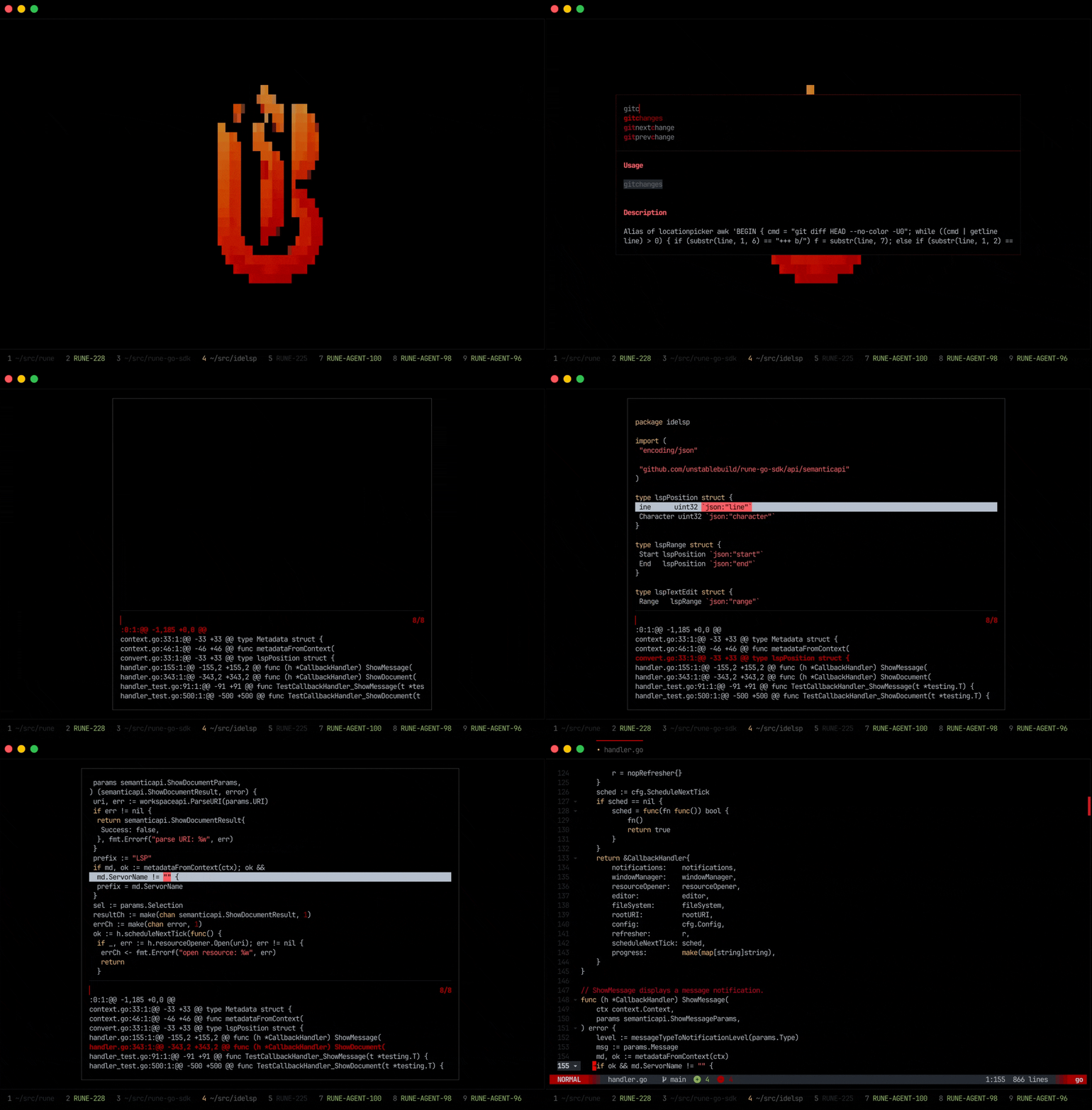
How it works
- Rune runs
<program> [<args>]through your shell with the workspace as the working directory. - Every line the program writes to standard output becomes one entry.
- Each line is parsed as a location using the
path[:line[:col]]convention. Anything after the column is treated as a label and ignored for navigation, sogit grep -n --columnstyle output likeinternal/app.go:42:9:return errFooworks out of the box. - As you move through the list, the focused entry's file is loaded into a preview pane with the target line highlighted.
- Pressing
<enter>opens the selected file in the previously focused window at the parsed coordinates.
You can fuzzy-filter the list as it streams in, and the picker keeps a history of past invocations so you can re-run a previous search.
The location format
Each output line must follow the path[:line[:col]] convention:
| Output line | Opens |
|---|---|
internal/app.go | the file, cursor unchanged |
internal/app.go:42 | line 42 |
internal/app.go:42:9 | line 42, column 9 |
internal/app.go:42:9:return errFoo | line 42, column 9 (rest is a label) |
Paths are resolved relative to the workspace root. The first :-separated
segment that parses as a positive integer is treated as the line number, which
keeps the parser tolerant of Windows-style paths such as C:\foo\bar.go:42:5.
Basic usage
Run the command from the command prompt with any program that emits locations. For example, to grep the workspace:
locationpicker grep -n -R TODO
Rune executes grep -n -R TODO in the workspace, shows every match as an entry,
and lets you fuzzy-filter and jump to one.
Because the program runs through your shell, you can use any tool that prints
path:line output: grep, git grep, rg, ag, awk, or your own script.
Aliases
Typing a full command every time is tedious. The natural way to use
locationpicker is to wrap your common searches in command aliases so they get a
short, memorable name and can take arguments via $1.
Each token you pass is re-quoted before it reaches the shell, so alias bodies do not need extra quoting for ordinary single-token arguments (those without embedded whitespace).
- config.yaml
- config.star
command:
  aliases:
    # Jump to any TODO or FIXME.
    todogrep: locationpicker grep -n -R -E (TODO|FIXME)
    # git grep with column info for precise cursor placement.
    gitgrep: locationpicker git grep -n --column -- $1
    # Jump straight to merge-conflict markers.
    gitconflicts: locationpicker git grep -n --column '^<<<<<<<\|^=======$\|^>>>>>>>'
"command": {
    "aliases": {
        # Jump to any TODO or FIXME.
        "todogrep":  "locationpicker grep -n -R -E (TODO|FIXME)",
        # git grep with column info for precise cursor placement.
        "gitgrep":   "locationpicker git grep -n --column -- $1",
        # Jump straight to merge-conflict markers.
        "gitconflicts": "locationpicker git grep -n --column -E '^(<<<<<<<|=======$|>>>>>>>)'",
    },
},
With these defined you can run todogrep, gitgrep "foo bar", or
gitconflicts directly from the command prompt.
Key bindings
Bind your most-used pickers to keys so they are one keystroke away. The
{prompt} instruction opens the
command prompt regardless of your activation key, so the
binding pre-fills the prompt and leaves your cursor ready to type a query.
- config.yaml
- config.star
command:
  key_bindings:
    # Open the prompt pre-filled with `gitgrep ` so you can type a query.
    <alt-g>: echo {prompt}gitgrep<space>
    # Run a parameterless picker immediately.
    <alt-t>: todogrep
"command": {
    "key_bindings": {
        # Open the prompt pre-filled with `gitgrep ` so you can type a query.
        "<alt-g>": "echo {prompt}gitgrep<space>",
        # Run a parameterless picker immediately.
        "<alt-t>": "todogrep",
    },
},
Recipes
These examples cover common workflows. They assume a POSIX-like shell and that
the listed tools are on your PATH.
Search with ripgrep
If you prefer ripgrep, it already emits
path:line:col with --vimgrep:
- config.yaml
- config.star
command:
  aliases:
    rg: locationpicker rg --vimgrep $1
"command": {
    "aliases": {
        "rg": "locationpicker rg --vimgrep $1",
    },
},
Jump to changed hunks
Present every changed hunk (working tree vs HEAD) as a location pointing at the
first changed line of the hunk. The awk script reads git diff -U0 and emits a
path:line:1:hunk entry for each @@ header. -U0 keeps each hunk anchored to
a single changed line so the picker entry points directly at the edit.
- config.yaml
- config.star
command:
  aliases:
    gitchanges: >-
      locationpicker awk 'BEGIN { cmd = "git diff HEAD --no-color -U0";
      while ((cmd | getline line) > 0) {
        if (substr(line, 1, 6) == "+++ b/") f = substr(line, 7);
        else if (substr(line, 1, 2) == "@@") {
          match(line, /[+][0-9]+/);
          print f ":" substr(line, RSTART+1, RLENGTH-1) ":1:" line
        }
      } }'
"command": {
    "aliases": {
        "gitchanges": "locationpicker awk 'BEGIN { cmd = \"git diff HEAD --no-color -U0\"; while ((cmd | getline line) > 0) { if (substr(line, 1, 6) == \"+++ b/\") f = substr(line, 7); else if (substr(line, 1, 2) == \"@@\") { match(line, /[+][0-9]+/); print f \":\" substr(line, RSTART+1, RLENGTH-1) \":1:\" line } } }'",
    },
},
Quoting and arguments
locationpicker re-quotes each argument before joining them and handing the
result to your shell, so argument boundaries survive even when a value contains
whitespace, quotes, or regex metacharacters. In practice this means:
- Ordinary single-token arguments (
$1with no spaces) need no extra quoting in an alias body. - Wrap a value in single quotes when it contains shell metacharacters you want
passed through literally, for example a regex with
|or<. The quotes protect it from the command prompt's tokenisation;locationpickerthen forwards it as a single argument.